Running Optimizations
While an optimization is in progress, DidgeLab provides real-time feedback on its status, acoustic targets, loss curves, and current results.
Status
The Status section provides a quick overview of your project's progress.
- States: You will see statuses such as "Not yet started," "Running," or "Completed."
- Time Tracking: View the elapsed time and the estimated time remaining.
- Controls: Use the buttons in this section to manually start or stop the optimization at any time.
Acoustic Target Configuration
Here, you can view - and even update - your acoustic targets while an optimization is running. This is particularly useful if you notice the design isn't evolving as expected; you can adjust the weights on the fly to steer the optimizer toward the specific traits you value most.
Understanding Loss
In optimization, Loss is a numerical value representing the deviation of the didgeridoo's current design from your target.
- Total Loss: This is the sum of all individual losses (e.g., frequency loss + scale loss).
- Weighted Loss: If you assign a weight to a target, its loss is multiplied by that weight, making it a higher priority for the optimizer.
The Loss Chart
The optimizer evaluates many different shapes simultaneously. The loss chart tracks the performance of the "best" individual (the one with the lowest total loss) across generations.
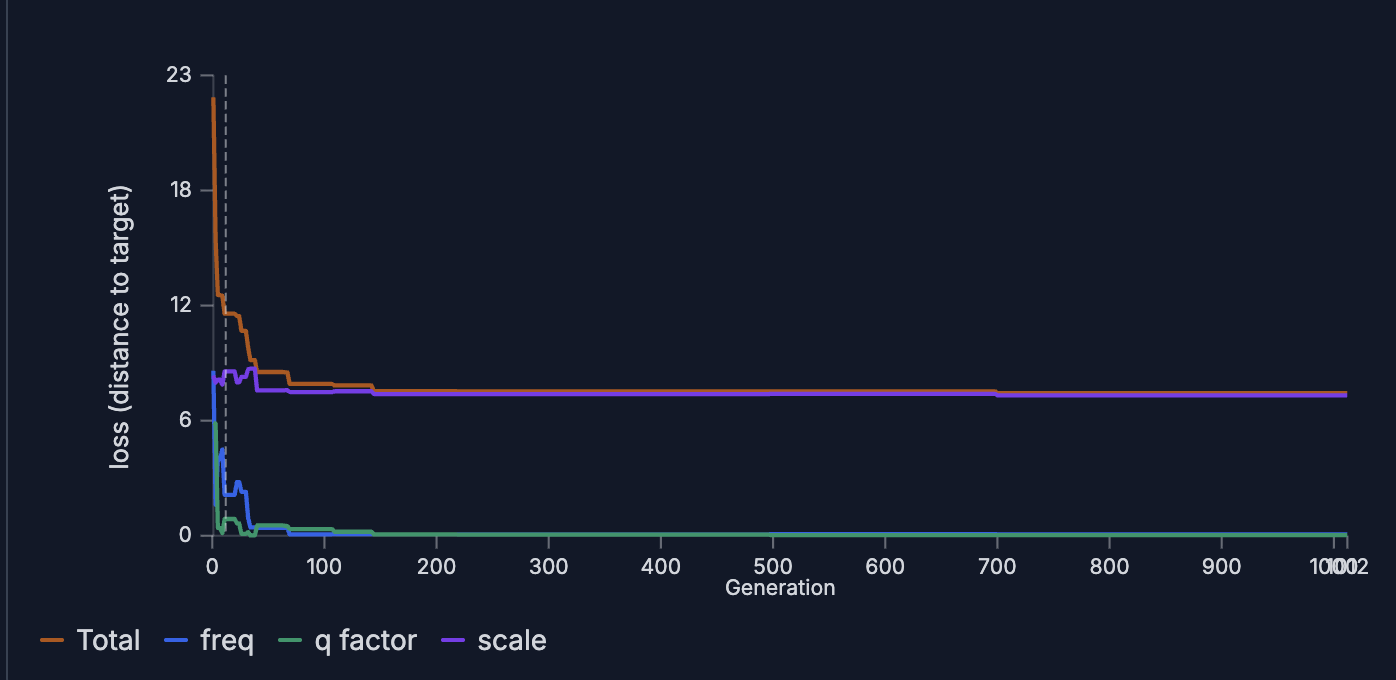
In the example above, the chart tracks:
- freq: The loss related to specific frequency tuning.
- scale: How well the resonances fit a specific musical scale.
- q factor: The loss associated with the desired width/sharpness of acoustic peaks.
- total: The combined sum of the three lines above.
Analyzing the Data
- Balancing Weights: If the scale loss remains high while freq is low, the optimizer is sacrificing the scale to hit the specific note. To fix this, increase the weight of the scale target or decrease the others.
- Diminishing Returns: Notice how the total loss improves until generation 150 and then flattens out. This is common behavior. If the loss doesn't improve for 100 generations, it likely won't improve much further. Stopping the optimization early (e.g., at generation 250) saves valuable computational resources.
Results
The Results section displays the 10 best shapes generated so far (those with the smallest total loss). You can toggle between "Individual 1" (the best result), "Individual 2," and so on. For each individual, you can analyze:
- Didgeridoo Bore: A visual representation of the internal shape. You can download this data in JSON, Excel, or CSV formats. For details on how to use these files, see our guide on shape formats.
- Tuning Table: Lists the resonant peaks by frequency and note.
Pro Tip: Tuning is shown in "cents." A value like D (-38 cents) means the note is between C# and D. Generally, a deviation under 5 cents is excellent, while anything over 10 cents is audibly out of tune. - Impedance Spectrum: A graph showing the acoustic peaks. For help interpreting this, see How to Read DidgeLab Outputs.
- Individual Loss: A breakdown of how this specific individual performed against each of your targets.